Attract buyers and increase traffic to your Shop with new features
Learn how new Shop features can increase your reach and help grow your business.
What you need to know
We've jam-packed Shops with new features built to help you grow your business. Here are some new ways you can drive more traffic and buyer interest to your Shop:
- Create newsletters for previous and interested buyers using customisable templates that highlight your new inventory. You can also send promotional offers to drive growth
- Activate your inventory strips – automatically or manually – to showcase new and seasonal inventory to attract more buyers
- Increase your brand recognition and visibility with a Shop logo that will now appear across eBay, including on listing pages, which drives interest from buyers who can save and follow your Shop
- Use new reporting that reveals buyer engagement on your newsletters
- Reach more buyers, draw attention to your Shop, and encourage repeat customers with updated sharing features on popular social media platforms
- Drive more buyers to your Shop with enhanced search navigation and recommended Shops on the eBay homepage increasing your reach
Attract buyers to your Shop with merchandising strategies
Showcasing new inventory is a great way to attract a buyer’s attention. These features could help you reach more customers, drive repeat sales, and establish a loyal customer base.
Gain more interest by emailing newsletters offering promotions to buyer groups
Draw attention to your top-selling listings by creating customised newsletters, buyer groups, and promotions using the tools on Seller Hub. Here’s how:
- Send templated newsletters to reach beyond your subscribers and engage targeted buyer groups, such as buyers who’ve bought from you in the last 30 to 180 days
- Reach buyers with promotions like coupons, order discounts, markdown and sale events, that you can set up easily in Seller Hub
Activate your inventory strips to attract more buyers
Create inventory strips to showcase your new or seasonal items. You can add items manually or automatically to draw buyers’ attention to your bestsellers, new inventory, or listings that are ending soon. Merchandising strategies showed that buyers are 25% more likely to view highlighted listings*.
* eBay data, Global, April 2022
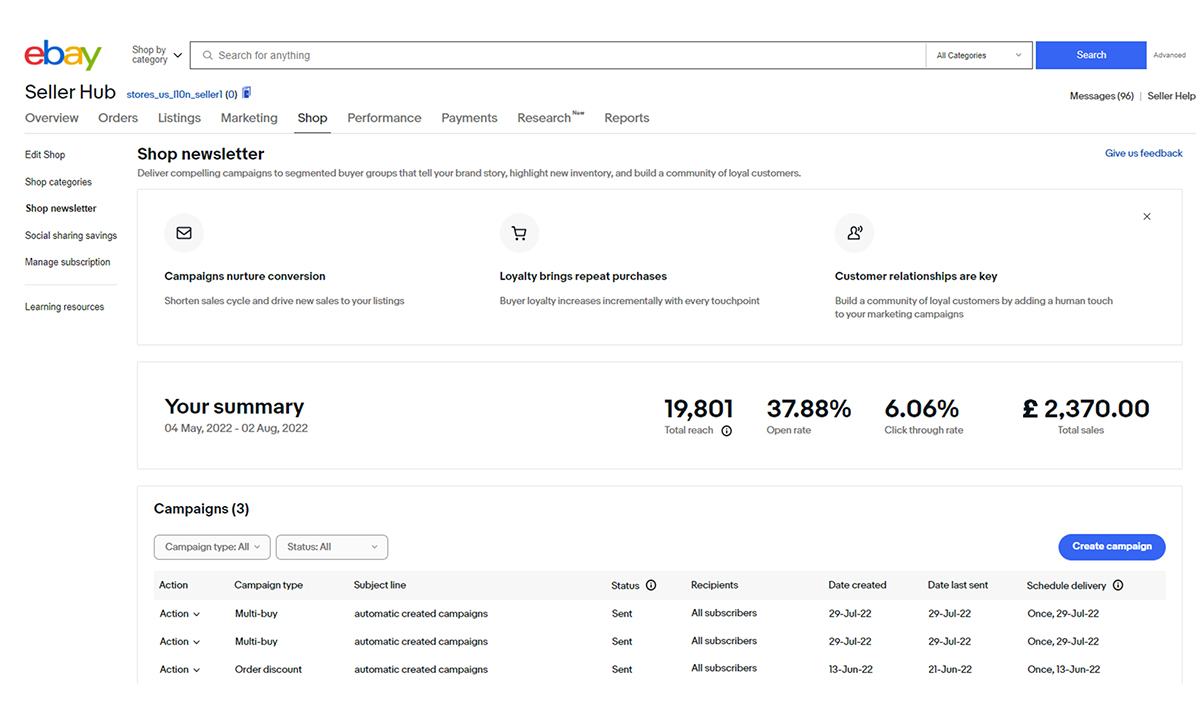
Learn how your newsletters are performing with new reports
New reporting capabilities let you see how many buyers have opened and clicked on an item on your newsletter. You can also see how many total buyers you’ve reached and the total sales you made 30 days after a buyer clicks on a product link. These are great ways to understand how many of your buyers are engaging with your newsletters, and with your Shop.
Promote your products across social channels
Social media is a great way to introduce your followers to new inventory or promotions, grow your brand, and attract new buyers. It’s also an easy way to highlight your inventory and drive traffic to your Shop, items, or categories.
Now, when you share from anywhere across eBay, you’ll have the same updated list of social channels to choose from, including Facebook, Twitter, and Pinterest. We’ve also added new channels like Instagram and Snapchat, where you can share customisable stickers to your Instagram stories, posts, and Snap stories straight from the eBay app. Sellers who use social media and email to connect with their buyers attracted repeat business and saw a 38% increase of views to their Shopfront*.
* eBay data, Global, June 2022
Elevate your brand
Improve your imagery, create categories, and add your logo to build your brand and increase your visibility across eBay. Use the available features to get more eyes on your Shopfront.
- Design a professional look using the image editing tools available when editing your Shop and get noticed by more buyers
- Customise your inventory using the featured listings tool and create categories that will get the most attention
- Add a logo that makes you stand apart from the rest – new rounded logos will be automatically used for all Shop subscribers
Get more visibility for your Shop
Getting your Shop seen by buyers is important, so we’ve added more ways buyers can find and save your Shop across eBay. Here’s what we've done so far.
Searching Shops is easier with new ways to appear on eBay
If a buyer searches for your Shop using the eBay search bar, a link appears pointing them right to your Shopfront
Optimise your Shop’s visibility to increase buyers’ interest
Buyers can now see Shop names on listing pages to easily find your Shopfront. We’ve also added new features on Shop pages to help buyers navigate through listings easily.
- Listing pages now show your Shop name and branding in place of your profile logo and username, and your Shop logo can appear in more places too
- Listing pages have a new Shop category module with up to 9 categories and a “See all” button for buyers to explore more
- Your Shop details and branding are now featured more prominently on your Seller Profile page and buyers can save your Shop as a favourite
- A redesigned category listing navigation has been added to your Shopfront giving buyers an easy, at-a-glance way to explore your Shop categories
- Desktop users can see a new seller module allowing buyers to view your Shop’s logo, name, and popular categories when viewing one of your listings
Next steps
Start using these Shop features to help you elevate your brand and grow your business. If you haven’t finished customising your Shopfront here’s what you should try:
- Upload a logo and banner that reflects your unique brand making it easier for buyers to find your Shop by increasing your visibility on eBay
- Send newsletters to your buyer groups using customised templates
- Use the reporting capabilities to see how many buyers are responding to your newsletter’s inventory and promotions
- Share your listings on social media to get your brand noticed by more buyers
FAQ
How do I set up a newsletter for my Shop?
Setting up a newsletter is easy with the templates available to you. Check out how to design your newsletter and more helpful tips.
What if my newsletter performance drops or is below standard?
Use the metrics available to see which inventory is getting the least views and modify the content on your newsletter. You can add a promotion, such as a coded coupon, or create buyer groups based on your buyers' previous purchases to gain interest in new inventory.
Can I turn off my inventory strips?
Yes, but you’d only want to do that if conversion isn’t good. You can find out more about setting up featured listings and categories on the Help page.
How do I set up a buyer group?
Creating buyer groups takes a few minutes with easy-to-follow instructions on Seller Hub. For more information on buyer groups read more here.
How does a buyer subscribe to my Shop?
It’s easy for buyers to subscribe by clicking the “Save Seller” heart icon on the listing page or on your Shop’s page.